“Like you’re 5” here means make it obvious—plain language first. We’ll name topics partitions, and consumer groups as soon as the story in your head feels solid.
Imagine placing an order on any e-commerce platform. Now imagine hundreds of people doing this at the same time. Each order isn’t a single action, it’s a sequence of steps like applying coupons, checking inventory, processing payment, and sending confirmation. These steps generate events continuously, and if even one is missed, the system breaks.
Example
One user places an order → payment succeeds but confirmation email fails → user thinks order didn’t go through → chaos. Multiply this by thousands, and your system collapses.
This is the core problem: too many things happening at once, continuously.
Kafka
Kafka solves this by acting as a system that manages a continuous stream of events. Instead of systems directly talking to each other (which creates tight coupling and failures), everything sends data into Kafka, and whoever needs it reads from there.
Example
Order service doesn’t call payment service directly. It sends an “order placed” event to Kafka. Payment service reads it from Kafka and processes it. No direct dependency.
You can think of Kafka as a central pipeline where all data flows. It sits in the middle and handles the movement of information between systems in a reliable and scalable way.
Order → Payment → Email → Inventory
Producer → Kafka → multiple Consumers
Everything connects through Kafka, not to each other.
Pub-Sub
Consider a construction site:
- The Owner defines the overall work.
- The Contractor manages and distributes tasks.
- The Workers perform tasks based on their specialization (e.g., plumbing, electrical, masonry).
The contractor does not manually assign each task to a specific worker. Instead, work is categorized, and workers take tasks based on their expertise.
Mapping to Pub-Sub Architecture
| Construction site | In pub-sub | Role |
|---|---|---|
| Owner | Publisher | Sends tasks (messages) without knowing who will execute them. |
| Contractor | Message broker (event bus) | Receives messages and routes them based on categories (topics). |
| Workers | Subscribers | Subscribe to specific types of work (topics) and receive only relevant tasks. |
A Publish–Subscribe (Pub-Sub) architecture is a messaging pattern where:
- Publishers send messages to a broker without knowing the subscribers.
- The broker organizes messages into topics (or channels).
- Subscribers receive messages only from the topics they are subscribed to.
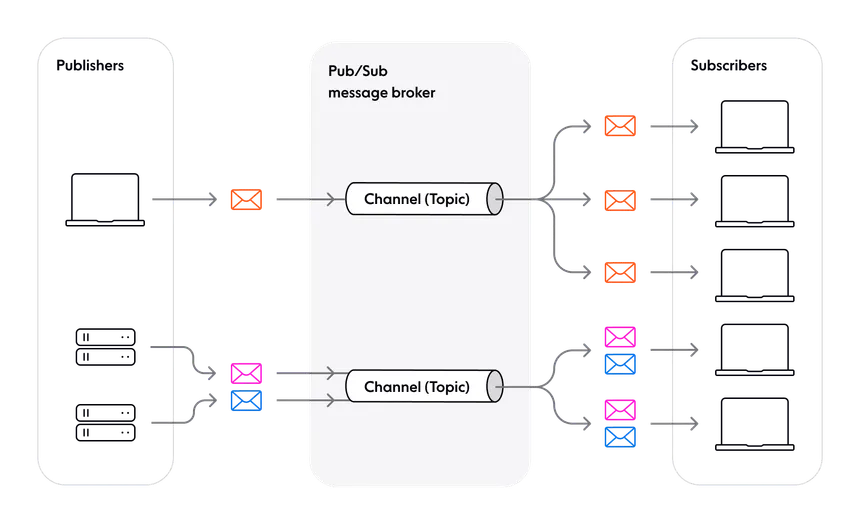
Kafka works on a publish–subscribe model, where producers publish messages and consumers subscribe to what they need. Producers don’t know who the consumers are.
Example
An “order placed” event is published.
- Payment service consumes it
- Order service consumes it
- Analytics consumes it
Understanding Kafka Terminologies
Message streams
Kafka deals with continuous streams of events, meaning data is always flowing. Instead of processing in batches, Kafka handles events in real time as they occur.
Example
Every click, order, or payment generates an event that keeps moving through the system like a live stream.
Topics
To organize this continuous flow, Kafka groups events into topics, which are simply categories of messages.
Example
order_events→ all order-related datapayment_events→ all payment-related data
Producers send data to topics, and consumers read only the topics they care about.
Partitions
To handle large-scale data efficiently, each topic is divided into partitions.
Partitions allow Kafka to process data in parallel by splitting one stream into multiple ordered lanes. Each partition maintains its own order, but there is no global order across all partitions.
Example
Instead of one sequence:
Order1 → Order2 → Order3
You get parallel lanes. Order is within each partition only, not globally across partitions:
Partition 0 → Order1, Order4
Partition 1 → Order2, Order5
Partition 2 → Order3, Order6
Consumer groups
To process data, Kafka uses consumer groups, which are sets of consumer instances working together.
Kafka distributes partitions across consumers in a group so that each partition is handled by only one consumer at a time. This ensures efficient load sharing and avoids duplicate processing within the group.
Example (topic has three partitions)
- 3 consumers in the group → each gets 1 partition
- 2 consumers → one handles 2 partitions, the other 1
- 5 consumers → only 3 do work; 2 stay idle
flowchart LR

    P["Kafka Producer"]

    subgraph T["Topic: ORDER_EVENTS"]
        P0["Partition-0"]
        P1["Partition-1"]
        P2["Partition-2"]
    end

    P --> T

    subgraph CG1["GROUP: Payment-g1"]
        direction TB
        C1["Payment-1"]
        C2["Payment-2"]
        C3["Payment-3"]
    end

    subgraph CG2["GROUP: Inventory-g1"]
        direction TB
        I1["Inv-1"]
        I2["Inv-2"]
    end

    subgraph CG3["GROUP: Notification-g1"]
        direction TB
        N1["Notify-1"]
        N2["Notify-2"]
    end

    P0 --> C1
    P1 --> C2
    P2 --> C3

    P0 --> I1
    P1 --> I2
    P2 --> I1

    P0 --> N1
    P1 --> N2
    P2 --> N1

    %% Subgraph panels: light surfaces stay legible on Mermaid default (light) and dark canvases
    style T fill:#f1f5f9,stroke:#475569,stroke-width:2px,color:#0f172a
    style CG1 fill:#fff7ed,stroke:#c2410c,stroke-width:2px,color:#7c2d12
    style CG2 fill:#ecfdf5,stroke:#047857,stroke-width:2px,color:#064e3b
    style CG3 fill:#eff6ff,stroke:#1d4ed8,stroke-width:2px,color:#1e40af

    %% Nodes: saturated fills, light label text, bright strokes for separation in both themes
    classDef producer fill:#0f766e,stroke:#5eead4,stroke-width:2px,color:#f0fdfa
    classDef partition fill:#1d4ed8,stroke:#93c5fd,stroke-width:2px,color:#f8fafc
    classDef consumer fill:#c2410c,stroke:#fdba74,stroke-width:2px,color:#fffbeb

    class P producer;
    class P0,P1,P2 partition;
    class C1,C2,C3,I1,I2,N1,N2 consumer;
Combining Two Messaging Models
Kafka combines publish–subscribe and queue-based processing in one system.
| You configure | Kafka behaves like |
|---|---|
| Same topic + same consumer group | A queue: work is shared across consumers; each message is processed once within that group. |
| Same topic + different consumer groups | Pub-sub: each group sees the full stream independently. |
Across different consumer groups, Kafka behaves like publish–subscribe: multiple independent systems can read the same stream of data without affecting each other.
Within a consumer group, Kafka behaves like a queue: messages are distributed across consumers so that each message is processed only once within that group.
Example
payment-service (group.id=payment-g1)- processes ordersanalytics-service (group.id=analytics-g1)- also reads orders
Both receive the same events independently (pub-sub), but inside each group, the work is split across instances (queue).
This is why Kafka is fast and scalable.
It splits data into partitions, processes them in parallel, and allows multiple systems to consume the same data without conflict. You can scale by simply adding more partitions or more consumers.
Example
Traffic increases → add more partitions → add more consumers → system keeps up without redesign.
Finally, Kafka ensures data is safe and ordered.
Messages are stored reliably and can be replicated across systems. Kafka guarantees that messages stay in order within a partition, which is critical for flows like payments and order processing.
Example
Payment initiated → payment success → order confirmed
These must happen in order, and Kafka preserves that within a partition.
Conclusion
By leveraging Kafka, a system can be built that:
- Manages continuous streams of events
- Acts as a central pipeline
- Splits work using partitions
- Distributes processing via consumer groups
- Allows multiple systems to use the same data independently
And most importantly, it keeps everything from breaking when things scale.